Q. How many SSDs can my PC have?
A typical PC can hold between 2 and 5 SSDs, depending on how many M.2 slots and SATA ports your motherboard has. Some high-end motherboards can support even more. Use the free calculator below to find out exactly how many SSDs your specific PC can take.
Just answer a few simple questions, and you’ll get your answer in seconds.
Not sure what M.2 or SATA means? Don’t worry, every question in the calculator has an explanation to guide you
Interactive SSD Slot Calculator
Frequently Asked Questions About SSDs in a PC
Q. What is an M.2 slot?
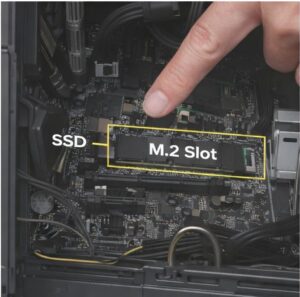 A: M.2 slot is a small rectangular slot on your motherboard where a thin stick-shaped SSD plugs in directly — no cables needed. It’s the fastest type of SSD connection available in most modern PCs. Most motherboards have 2 M.2 slots, usually labelled M2_1 and M2_2.
Q. How do I find my M.2 slots?
A: Open your PC case and look at the motherboard. M.2 slots are long, thin horizontal slots, usually located in the middle or lower section of the board. They’re often outlined in a different colour or labelled directly on the board. If your PC already has an SSD and no cables attached to it, it’s almost certainly sitting in an M.2 slot.
Q. What is a SATA port?
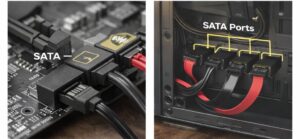
A: A SATA port is a small L-shaped connector on your motherboard that connects 2.5″ SSDs and traditional hard drives using a flat ribbon cable. They’re slower than M.2 NVMe SSDs but still much faster than an old spinning hard drive. Most motherboards have between 4 and 6 SATA ports.
Q. How do I find my SATA ports?
Look along the right-hand edge of your motherboard inside your PC case. You’ll see a cluster of small L-shaped orange or black connectors — those are your SATA ports. They’re usually labelled SATA1, SATA2, and so on. Any drives connected to them will have a thin flat cable running from the port to the drive.
Q: Can I have 2 SSDs in my PC?
A: Yes, absolutely. Most standard PCs have at least 2 M.2 slots and 4 SATA ports, so running 2 or more SSDs at the same time is very common. You can use them to split your Windows installation and your game storage, which can actually improve performance.
Q: Can a PC have both an SSD and a hard drive (HDD)?
A: Yes. SSDs and HDDs can run together in the same PC without any issues. A popular setup is to use a fast SSD for Windows and your most-used programs, and a larger, cheaper HDD for storing files, photos, and videos.
Q: Can I add another SSD to my PC without reinstalling Windows?
A: Yes. Adding a second SSD does not affect your existing Windows installation at all. Windows stays on your original drive. The new SSD just appears as extra storage.
Q: How many M.2 SSDs can a motherboard support?
A: Most standard ATX motherboards support 2 to 3 M.2 SSDs. High-end and workstation boards can support 4 or more. The exact number depends on your specific motherboard model — check your manual or search your motherboard name online to confirm.
Q: Does having more SSDs slow down my PC?
A: No. Adding more SSDs does not slow down your PC. Each SSD works independently and uses very little power (around 3 to 5 watts each), so your system performance stays the same.
Q: Can I plug in an SSD while my PC is on?
A: It depends on the type. External SSDs connected via USB can be plugged in while the PC is running. Internal M.2 and SATA SSDs should only be installed while the PC is fully powered off.
If your Windows is not detecting you SSDs, check this guide on Windows not detecting SSDs.

I spent 2 years managing a gaming café where I maintained a full setup — multiple gaming PCs, PS5 consoles, and racing simulators running back to back every day. I hold a Diploma in Computer Applications and started FixMyGames.in to document the real fixes I learned on the job — not the generic advice you find everywhere else.