I used to manage a gaming parlour with multiple PCs running back to back every day. Every time there is a power outage, the PCs that were not shut down properly do not turn on normally — they go straight into BIOS. That is the most common outcome I have seen, and it is actually a good sign. It means the PC is working but the outage disrupted something the system needs to sort out before it can boot.
If your PC won’t turn on after a power outage, the fix is usually simpler than you think. Here is how to work through it.
Why Does a Power Outage Cause This?
A sudden power cut does not give your PC time to shut down properly. This can cause three types of problems:
- Minor — The surge protector tripped or the PC needs a power drain. Easy fix, takes 2 minutes.
- Moderate — The PSU absorbed the surge and is now failing or dead.
- Serious — The motherboard or a component got directly damaged by a voltage spike.
Most cases are minor. Start from the top and work your way down.
Fix 1: Check Your Surge Protector, UPS, or Power Strip
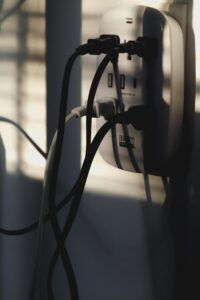
This is the most skipped step and it solves the problem more often than people expect.
A surge protector, UPS, or even a basic power strip can stop delivering power to your PC after an outage — and they all look completely normal when this happens.
If you use a surge protector:
- Look for a reset button on the strip. It is usually red or black and sits on the side or front.
- Press it once firmly.
- Try turning the PC on again.
If you use a UPS:
- Check if the UPS itself is still powered on. Some UPS units shut themselves off during a heavy outage to protect the battery.
- Switch it off, wait 30 seconds, then switch it back on.
- Try turning the PC on again.
If you use a basic power strip with no protection:
- Unplug your PC from the strip entirely.
- Plug it directly into a wall outlet.
- Try turning the PC on. The strip itself may have been damaged by the surge.
Tip: If your surge protector trips regularly during outages, it is doing its job — but it may be time to replace it. A worn out surge protector stops protecting your components.
Fix 2: Drain Residual Power (Flea Power)

After a sudden power cut, your PC can hold leftover electrical charge that prevents it from starting normally. This is called flea power and it is a very common cause of a PC not turning on after an outage.
- Unplug the power cable from the back of your PC completely.
- Hold the power button for 30 seconds.
- Plug the cable back in.
- Try turning the PC on again.
This forces the motherboard to fully reset and clears any leftover charge.
Fix 3: Boot Into BIOS and Restore Defaults
If your PC turns on but will not boot into Windows, this is exactly what I saw at the parlour after outages. The PC goes straight into BIOS because the sudden shutdown corrupted the boot settings or reset the system clock.
- Let the PC open BIOS on its own, or press Delete or F2 as soon as it powers on.
- Look for an option that says Load Optimised Defaults or Restore Defaults.
- Save and exit.
- The PC should boot into Windows normally.
If Windows still fails to load after this, the outage may have caused a file corruption issue. In that case, boot from a Windows USB and run Startup Repair.
If your PC opens BIOS but you are getting no display on the monitor, this guide covers that specifically: PC Turns On But No Display — How to Fix”
Fix 4: Check the Power Supply Unit
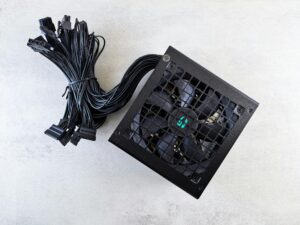
Power outages and voltage surges kill PSUs more than any other component. The PSU often takes the hit so your other parts do not have to.
Signs your PSU was damaged:
- The PC does not turn on at all — no fans, no lights, nothing
- Fans spin for one second then stop. If your PC keeps turning on and off repeatedly after the outage, this is worth reading: PC Turning On and Off Repeatedly — How to Fix“
- You smell something burnt near the back of the PC
- The PC worked fine before the outage and now does nothing
What to do:
- Unplug the PC and check that all internal power cables are seated properly.
- If you have access to a spare PSU, test with that.
- If not, take the PC to a technician and ask them to test the PSU output.
Important: Do not open or repair a PSU yourself. They hold charge even when unplugged.
“A failing PSU can also cause your monitor to show no display even when the PC powers on. See: PC Turns On But No Display — How to Fix“
Fix 5: Reset the BIOS Manually (CMOS Reset)
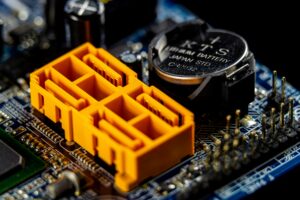
If the PC still will not turn on and you have ruled out the PSU, a manual BIOS reset is worth trying. A power surge can sometimes corrupt BIOS settings in a way that prevents the system from starting.
- Shut down the PC and unplug all cables.
- Open the cabinet and find the small round silver battery on the motherboard. This is the CMOS battery.
- Remove it carefully using a non-conductive tool.
- Wait for 5 minutes.
- Put the battery back in and reconnect the power.
- Turn the PC on.
“If none of the above fixed your issue, your starting point for any PC problem is here: PC Troubleshooting — How to Fix the Most Common PC Problems”
When to See a Professional
If none of the fixes above work, the surge likely caused direct damage to the motherboard or another component. Signs that this is the case:
- No standby LED on the motherboard even when plugged in
- Burnt smell coming from inside the case
- The PSU tests fine but the PC still does nothing
At this point, a technician will need to diagnose which component took the damage. Do not keep trying to power it on repeatedly as this can make things worse.
Frequently Asked Questions
Why does my computer go to BIOS after a power outage?
This happens because the sudden shutdown did not let the PC save its boot state properly. The BIOS detects that the last shutdown was not clean and opens itself so you can review the settings. Simply load optimised defaults, save and exit, and the PC should boot normally.
Can a power outage permanently damage a PC?
Yes, but it is not common. Most outages cause minor issues like a tripped surge protector or corrupted boot settings. The component most likely to suffer permanent damage is the PSU, which is designed to absorb surges to protect everything else.
Computer not turning on after a power outage — where do I start?
Start with the surge protector reset, then drain residual power by unplugging and holding the power button for 30 seconds. These two steps fix the majority of post-outage startup problems.
Will a power outage delete my files?
A power outage will not erase your files stored on an SSD or HDD. It can sometimes corrupt the Windows boot files, which makes it look like something is missing, but your data is almost always intact.
My PC turns on but shuts off immediately after a power outage. What does that mean?
This usually points to a PSU that was damaged by the surge. It can deliver just enough power to start but not enough to sustain the system. Test with a different PSU or have a technician check it.
Computer will not turn on after a power outage — is it the motherboard?
A damaged motherboard is possible but not the most likely cause. Work through the surge protector, flea power drain, and PSU checks first. The motherboard is usually the last thing to go because the PSU absorbs most of the surge damage.

I spent 2 years managing a gaming café where I maintained a full setup — multiple gaming PCs, PS5 consoles, and racing simulators running back to back every day. I hold a Diploma in Computer Applications and started FixMyGames.in to document the real fixes I learned on the job — not the generic advice you find everywhere else.